
Cricbet99 Register – How to Create a Cricbet99 Account
The Cricbet99 register process allows new users to create an account using a valid mobile number, OTP verification, a User ID and a password. The registration process is designed to verify the mobile number before the account is created.
If you are using Cricbet99 Red, you can follow the same registration flow to set up your account and create your login credentials.
How to Register on Cricbet99
To create a new Cricbet99 account, you need a valid mobile number that you can access during registration.
The basic registration process is:
Mobile Number → OTP Verification → User ID → Password → Confirm Password → Referral Code (Optional) → Register
Follow the steps below.
Step 1: Open the Cricbet99 Registration Screen
Open the Cricbet99 registration page and select the Register option.
If you are already registered and have an existing account, you do not need to create another account. You can select Login and use your existing credentials.
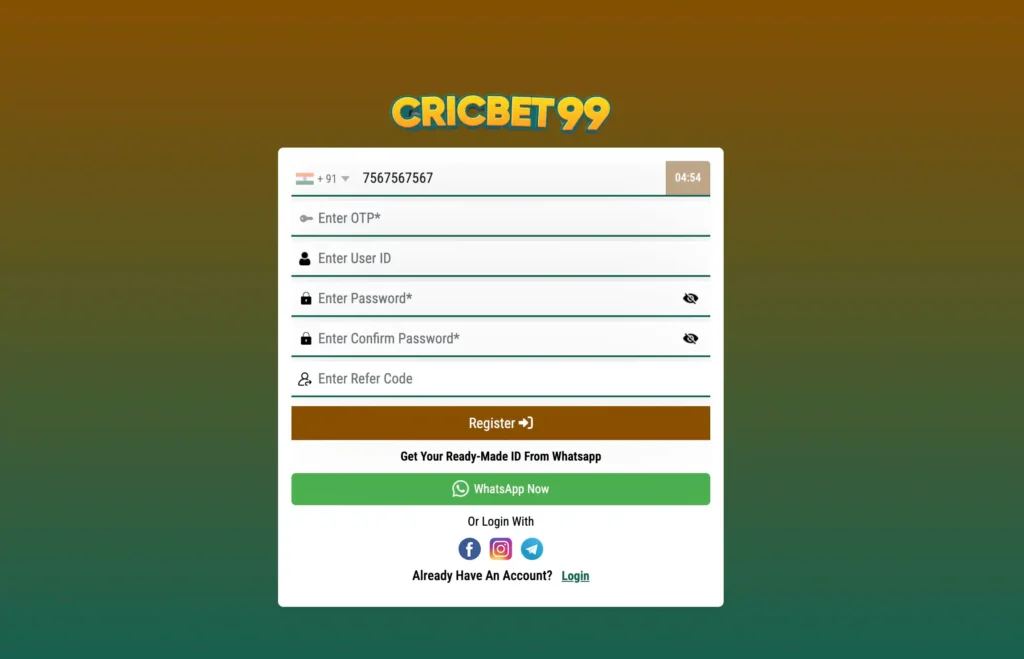
Step 2: Enter a Valid Mobile Number
Enter your valid mobile number in the registration form.
The mobile number should be accessible to you because it will be used to receive the OTP required for verification.
Before continuing, check the number carefully to make sure there are no typing errors.
Step 3: Click Get OTP
After entering your mobile number, click Get OTP.
An OTP will be sent to the mobile number entered during registration.
Make sure you have access to the phone so that you can complete the verification process.
Step 4: Enter the OTP
Enter the OTP received on your verified mobile number.
The OTP needs to be entered within the available verification period. For the registration process described here, enter the OTP within 5 minutes.
If the OTP expires, you may need to request another OTP and complete the verification again.
Step 5: Set Up Your Cricbet99 User ID
After verifying the mobile number, set up your User ID.
The User ID is used as one of the credentials for accessing your Cricbet99 account.
Choose the User ID carefully and make sure you remember it for future login attempts.
Step 6: Set Up Your Password
Create a password for your Cricbet99 account.
Use a password that you can remember while keeping it difficult for others to guess.
You will use this password when logging in through the User ID and password login option.
Step 7: Confirm Your Password
Enter the same password again in the Confirm Password field.
The two password entries should match before you continue.
If they do not match, check both fields and enter the password again.
Step 8: Add a Referral Code
If someone referred you to Cricbet99 and you have a referral code, you can enter it in the referral field during registration.
A referral code may be associated with referral benefits or promotional offers, depending on the applicable terms.
If you do not have a referral code, check whether the registration form allows you to continue without one.
Step 9: Click Register
After completing the required registration fields, review the information you entered and click Register.
Once the registration process is successfully completed, your Cricbet99 account will be created.
You can then use the User ID and password you created during registration to access your account.
Cricbet99 Registration Using WhatsApp
Depending on the available registration options, users may also have a WhatsApp option.
This provides an alternative way to request a ready-made Cricbet99 account.
How WhatsApp Registration Works
- Open the Cricbet99 registration screen.
- Select the WhatsApp option.
- You will be redirected to WhatsApp.
- Send the required message through WhatsApp.
- The account details can then be provided to you through the WhatsApp process.
- Use the provided Cricbet99 User ID and password to log in.
If you receive a ready-made User ID and password through this process, keep the credentials secure and do not share them with other people.
Cricbet99 Registration Through WhatsApp vs Normal Registration
There are two different registration approaches described on the platform:
| Registration Method | Process |
|---|---|
| Standard Registration | Mobile number → OTP → User ID → Password → Confirm Password → Referral Code → Register |
| Select WhatsApp → Redirect to WhatsApp → Send the required message → Receive account credentials → Login |
The standard registration method lets you set up your own User ID and password, while the WhatsApp method provides account credentials through the WhatsApp process.
Already Have a Cricbet99 Account?
If you already have a Cricbet99 account, you should not register again.
Instead, select the Login option and enter your existing credentials.
Depending on your account, you may be able to log in using:
- User ID and password
- Registered mobile number and password
- Registered mobile number and OTP
For a detailed login process, follow the Cricbet99 login guide.
Cricbet99 Registration Tips
Before completing registration, keep these points in mind:
- Use a valid mobile number that you can access.
- Enter the mobile number carefully before requesting the OTP.
- Enter the OTP within the available verification period.
- Remember the User ID you create.
- Confirm that both password fields match.
- Keep your login credentials private.
- If you have a referral code, enter it during registration if the form provides the option.
- If you already have an account, use the login option instead of registering again.
Cricbet99 Register – Quick Steps
The standard Cricbet99 registration process can be completed in the following order:
1. Open Register
Select the Cricbet99 registration option.
2. Enter Mobile Number
Provide a valid mobile number.
3. Get OTP
Click Get OTP and wait for the verification code.
4. Verify OTP
Enter the OTP received on your mobile number within 5 minutes.
5. Create User ID
Set up your Cricbet99 User ID.
6. Create Password
Enter your preferred account password.
7. Confirm Password
Enter the same password again.
8. Add Referral Code
Enter a referral code if you have one.
9. Register
Click Register to complete the account creation process.
10. Login
After successful registration, use your newly created credentials to log in.
Cricbet99 Signup FAQs
1. How do I register on Cricbet99?
Open the Cricbet99 registration screen, enter a valid mobile number, click Get OTP, verify the OTP, create your User ID and password, confirm the password, add a referral code if applicable, and click Register.
2. Do I need a mobile number to register for Cricbet99?
Yes. The standard registration process requires a valid mobile number because an OTP is sent to the number for verification.
3. How long do I have to enter the Cricbet99 OTP?
For the registration process described on this page, the OTP should be entered within 5 minutes. If it expires, you may need to request another OTP.
4. What User ID should I enter during Cricbet99 registration?
You need to set up the User ID you want to use for your Cricbet99 account. Choose an ID that you can remember because it can be required when logging in.
5. Can I use a referral code when registering on Cricbet99?
If you have been referred by someone and the registration form provides a referral-code field, you can enter the referral code during registration. Any referral benefit is subject to the applicable offer terms.
6. Can I register for Cricbet99 through WhatsApp?
If the WhatsApp registration option is available, you can select it and continue through WhatsApp. The process may provide you with a ready-made User ID and password that can then be used to log in.
7. What should I do if I already have a Cricbet99 account?
If you already have an account, you do not need to register again. Select Login and use your existing User ID and password or another available login method associated with your account.